|
Ground Motion Dialog
|   |
|
Ground Motion Dialog
| |
One important input dialog is the Ground Motion Dialog, in which the user can input 1 or 2 ground motion components for use in unidirectional or bi-directional analysis.
The ground motion definition dialog is vertically divided into two identical frames (Figure 5), one for each component. The paraemters which can be defined for each component are described as follows:
1. General record information can be entered in three input text boxes: Name (Identifier), Filename, and Description.
2. A "View" button, which generates a Plot Dialog with three plots showing the acceleration, velocity and displacement records of the current ground motion. The plots reflect the "modified" quantities as will be described next.
3. A "Read" button starts the File Selection Dialog which allows the user to pick a ground motion file to be read.
4. Two editable quantities: Scale Factor and Timescale. The scale factor is the amount by which the original record acceleration history is amplified before being used. The unchanged and changed records will be referred to as "Original" and "Modified" respectively. The "timescale" modifies the effective timestep and duration of the record and is defined as:
dtmodified = dtoriginal * timescale, which leads to
durationmodified = durationoriginal * timescale
5. Two lists of properties, one for the original and another for the modified record. The properties are summarized in the following table, which shows whether that quantity can be edited or not:
|
|
Original |
Modified |
||
|
Property Name |
Description |
Editable |
Description |
Editable |
|
|
|
|
|
|
|
N |
Original number of points read from the file |
No |
Number of points to be used, could be less or equal to N |
No |
|
dt |
The assumed time step |
No |
time step size to be used in analysis, will affect duration if changed, as well as the Timescale parameter |
Yes |
|
duration |
N * dtoriginal |
No |
N * dtmodified |
Yes |
|
Units |
The assumed units of the input |
No, except for User-defined records |
Units of analysis, (currently INCH only) |
No |
|
Peak Acceleration |
PGA of original record |
No |
PGA of modified record |
Yes |
|
Peak Velocity |
PGV based on acceleration record and dtoriginal |
No |
PGV based on acceleration record and dtoriginal |
Yes |
|
Peak Displacement |
PGD based on acceleration record and dtoriginal |
No |
PGD based on acceleration record and dtoriginal |
Yes |
Note: dtmodified and durationmodified can only be indirectly specified by changing the Timescale.
The modified PGA, PGV and PGD can be specified resulting in the program choosing an appropriate "amplification" for the original record. It is not possible to specify more than one of PGA, PGV and PGD at the same time. More control can be exercised by modifying dtmodified (by changing Timescale) which will affect PGV and PGD but not PGA.
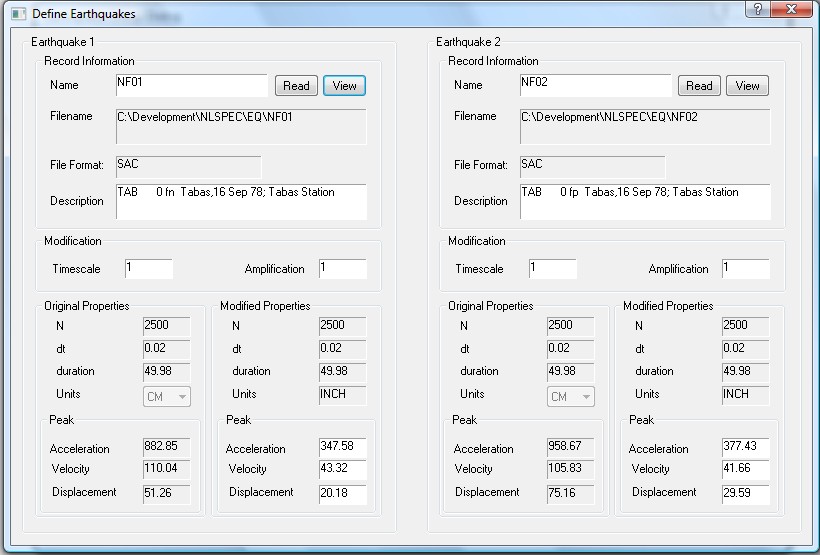
Figure 5: Ground Motion Dialog