|
Bispec Main Dialog
|   |
|
Bispec Main Dialog
| |
Most of the analysis parameters are entered via the Main Dialog box window (Figure 1). The user can see all of the required entries for each analysis type.
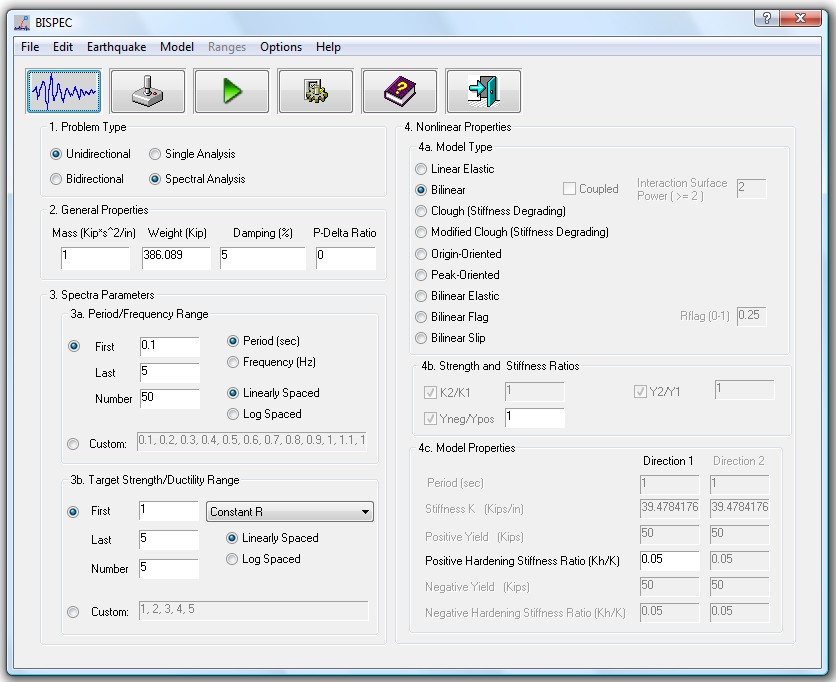
Figure 1 : Main Dialog
The analysis type can be determined by making a number of major selections:
3a. Period/Frequency range for spectral analysis. The user specifies:
3b. Target Strength/Ductility range for nonlinear spectral analysis. The user specifies:
4a. Hysteretic Model Type: The nonlinear hysteretic model to be used along with model specific parameters. More details are provided in each model's section:
4b. Strength and Stiffness Ratios:
4c. Hysteretic Model Parameters: The user can specify the model properties individually for the two directions
This dialog also has a few buttons that are:
1. The "Define Ground Motions" Button : brings up the Earthquake Suite Dialog.
2. The "Test Model" Button: Opens the Interactive Model Testing Dialog.
3. The "Run Analysis" Button: This button invokes the analysis, and the display of the result window.
4. The "Analysis Options" Button: Opens the Analysis Options Dialog.
5. The "Help" Button: Opens Help for Bispec.
6. The "Exit" Button: Quits Bispec.